
G-Player1.2.4 - Download
You'll be able to download in few seconds.
Publisher Description
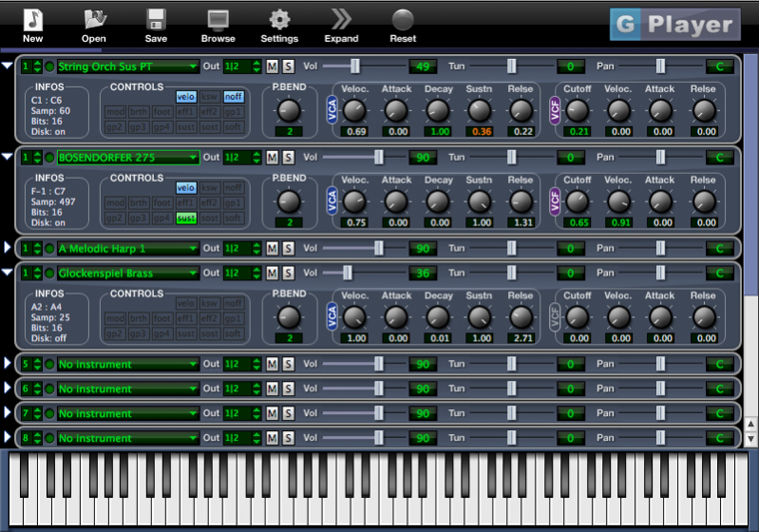
Forget converting and importing with random results. Save time and disk space. G-Player plays all your Gigastudio sound libraries without any conversion. G-Player was designed to play the large orchestral sound libraries and supports disk streaming, dimensions, keyswitches and layered instruments. G-Player was created to emulate the Gigastudio sound as close as possible. When other samplers can only improve their Gigastudio file import, we work directly on the audio engine until we get a perfect result. G-Player is optimized for the Gigastudio format and is very efficient in memory and CPU usage. G-Player can play and stream the compressed and accelerated samples which results in less hard disk activity than any another conversion based solution. G-Player operates as a virtual instrument software plug-in in all major hosts including Apple Logic, Steinberg Cubase, Digidesign ProTools (Mac only), Vienna Ensemble Pro, Steinberg Nuendo, MOTU Digital Performer, Ableton Live, Apple GarageBand, Cakewalk Sonar, Plogue Bidule, and many other VST and AudioUnit hosts
About G-Player
This Music Composers program is available in English. It was last updated on 29 September, 2026. G-Player is compatible with the following operating systems: Mac, Windows.
The company that develops G-Player is Soundlib. The latest version released by its developer is 1.2.4.
The download we have available for G-Player has a file size of 5.2 MB. Just click the green Download button above to start the downloading process. The program is listed on our website since 2010-10-20 and was downloaded 0 times. We have already checked if the download link is safe, however for your own protection we recommend that you scan the downloaded software with your antivirus. Your antivirus may detect the G-Player as malware if the download link is broken.
How to install G-Player on your Windows device:
- Click on the Download button on our website. This will start the download from the website of the developer.
- Once the G-Player is downloaded click on it to start the setup process (assuming you are on a desktop computer).
- When the installation is finished you should be able to see and run the program.
Program Details
System requirements
Download information
Pricing
Version History
version 1.2.4
posted on 2010-10-20
Disclaimer
External Download
We do not host G-Player on our servers. We did not scan it for viruses, adware, spyware or other type of malware. This app is hosted by the software publisher and passed their terms and conditions to be listed there. We recommend caution when installing it.
The external download link for G-Player is provided to you by apps112.com without any warranties, representations or guarantees of any kind, so access it at your own risk.
If you have questions regarding this particular app contact the publisher directly. For questions about the functionalities of apps112.com contact us.
